Scan the table.
Order in seconds.
TapMenuBD turns every table into a live order terminal — a printed QR, a real-time kitchen dashboard, and reviews only real diners can leave.
Everything a dine-in menu needs — nothing it doesn't.
One QR per table
Scan auto-detects the table via the link — customers never type a table number.
Real-time kitchen dashboard
New orders ring instantly. Accept, track, and serve — live, with sound.
Staff accounts & attribution
Add waiters under your account. Every order logs who accepted and served it.
Coupons that actually add up
Create discount codes with usage limits and expiry. The discount is computed server-side, so the total is always right.
Order-verified reviews
Only diners who actually ordered can leave a review — no spam ratings.
Your brand, not ours
Pick a template, add your logo — go fully white-label on higher plans.
Live in an afternoon, not a sales cycle.
No designer, no developer, no printing lead time. Pick a template, publish, and start seeing who's ordering.
- 01
Design your menu and table card
Pick one of four designs and it dresses both your live menu and the QR card you print — then change the corner flourish, the QR frame, the dot style, your colors and fonts until it looks like your restaurant.
4 designs6 corner flourishes2 QR frames24 fontsBangla + English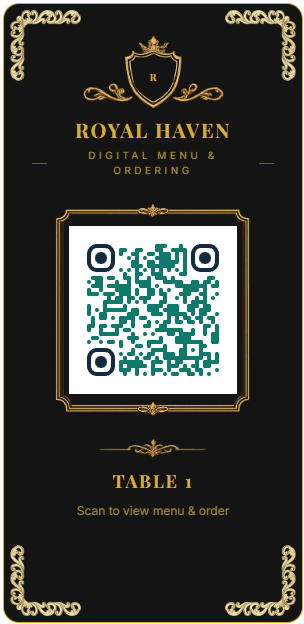

 R
RRoyal Haven
Digital Menu & Ordering
 Table 1
Scan to view menu & order
Card design
5 designsCorner flourish
6 stylesQR frame
2 framesQR style
6 dot stylesPlus your own colors, logo and 24 fonts — 9 of them Bengali-ready. The same design picks the matching live menu template, so the card on the table and the menu it opens are one look.
- 02
Publish and print your QR
Claim your restaurant's page and your menu goes live instantly. Print one QR per table, or one for the whole venue — no app for diners to download.
tapmenubd.com/yourrestaurant/menu?Table=1Table QR cardsInstant publish Your menu is livetapmenubd.com/yourrestaurant/menu?Table=1Table QR cards readyFirst order incoming
 - 03
Watch orders roll in
A live kitchen dashboard rings on every new order. See who ordered what from which table, and collect reviews only real diners can leave.
Live order feedStaff attributionVerified reviewsOrders
142
Revenue
৳48,600
Orders, last 10 days
Royal Haven
Scan to view menu & order
Card design
5 designsCorner flourish
6 stylesQR frame
2 framesQR style
6 dot stylesPlus your own colors, logo and 24 fonts — 9 of them Bengali-ready. The same design picks the matching live menu template, so the card on the table and the menu it opens are one look.
Published pricing · no sales call
Your menu, your QR cards, your look.
Every template ships with matching table QR cards — pick a look at signup, swap it anytime.
Royal Noir
Black & gold, for fine dining that wants weight on the table.
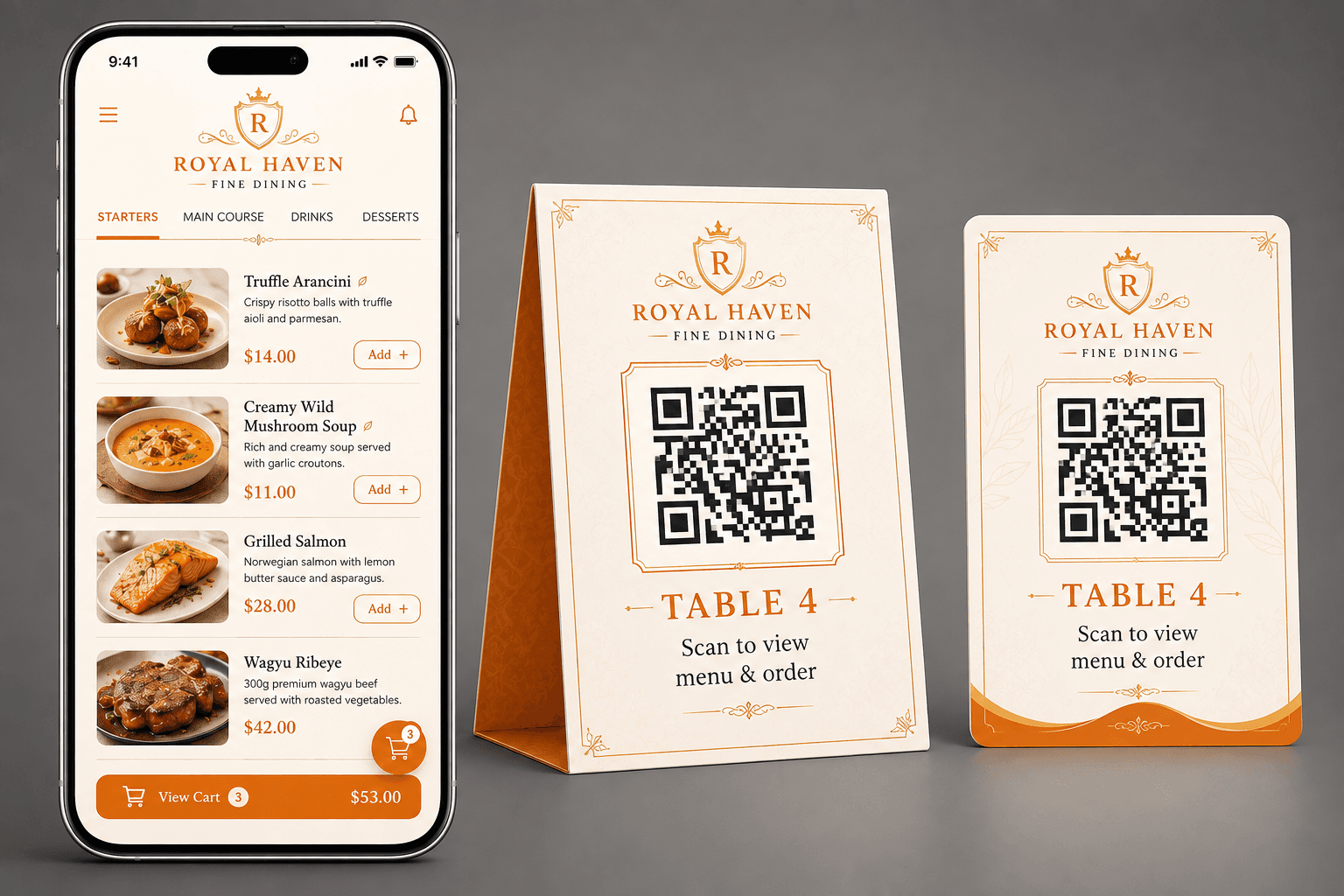
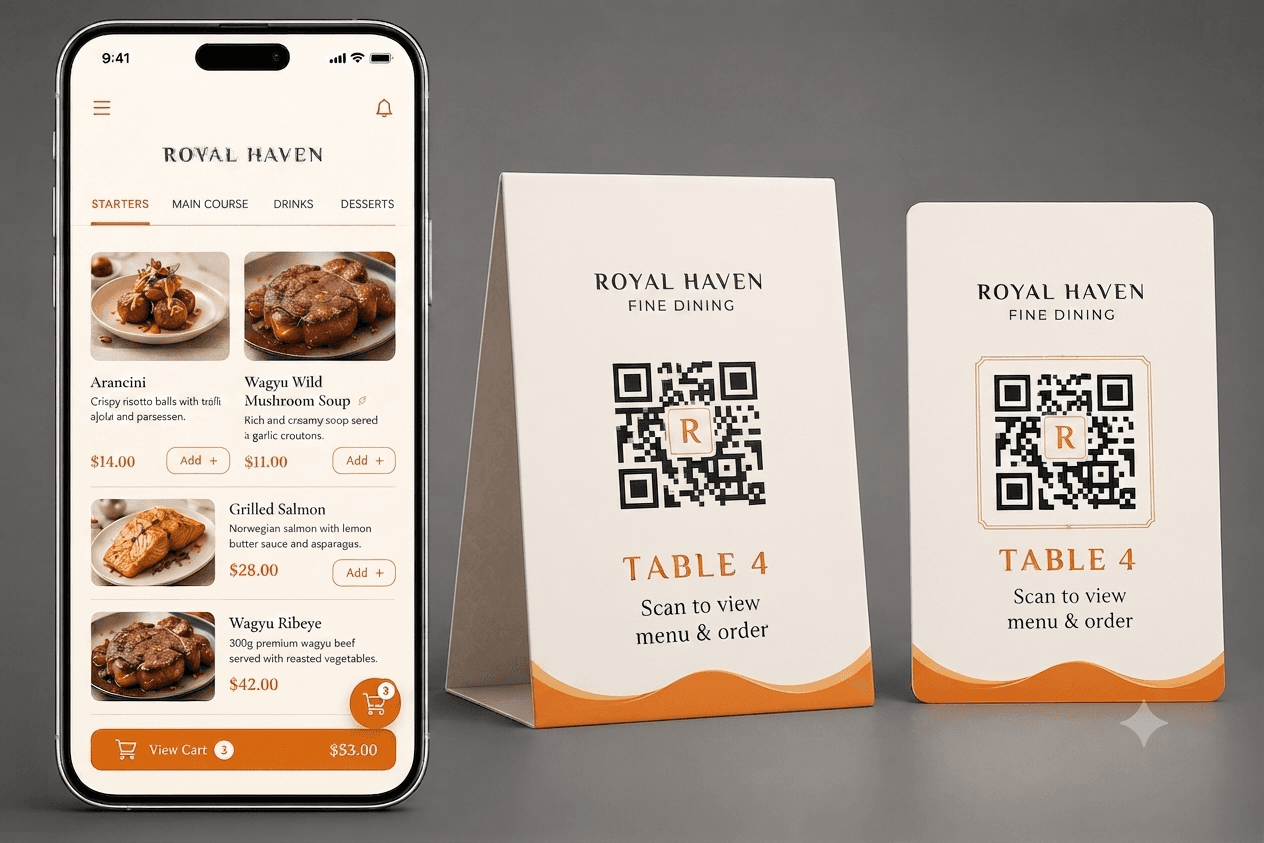
Royal Cream
Warm ivory and rust — inviting, still upscale.
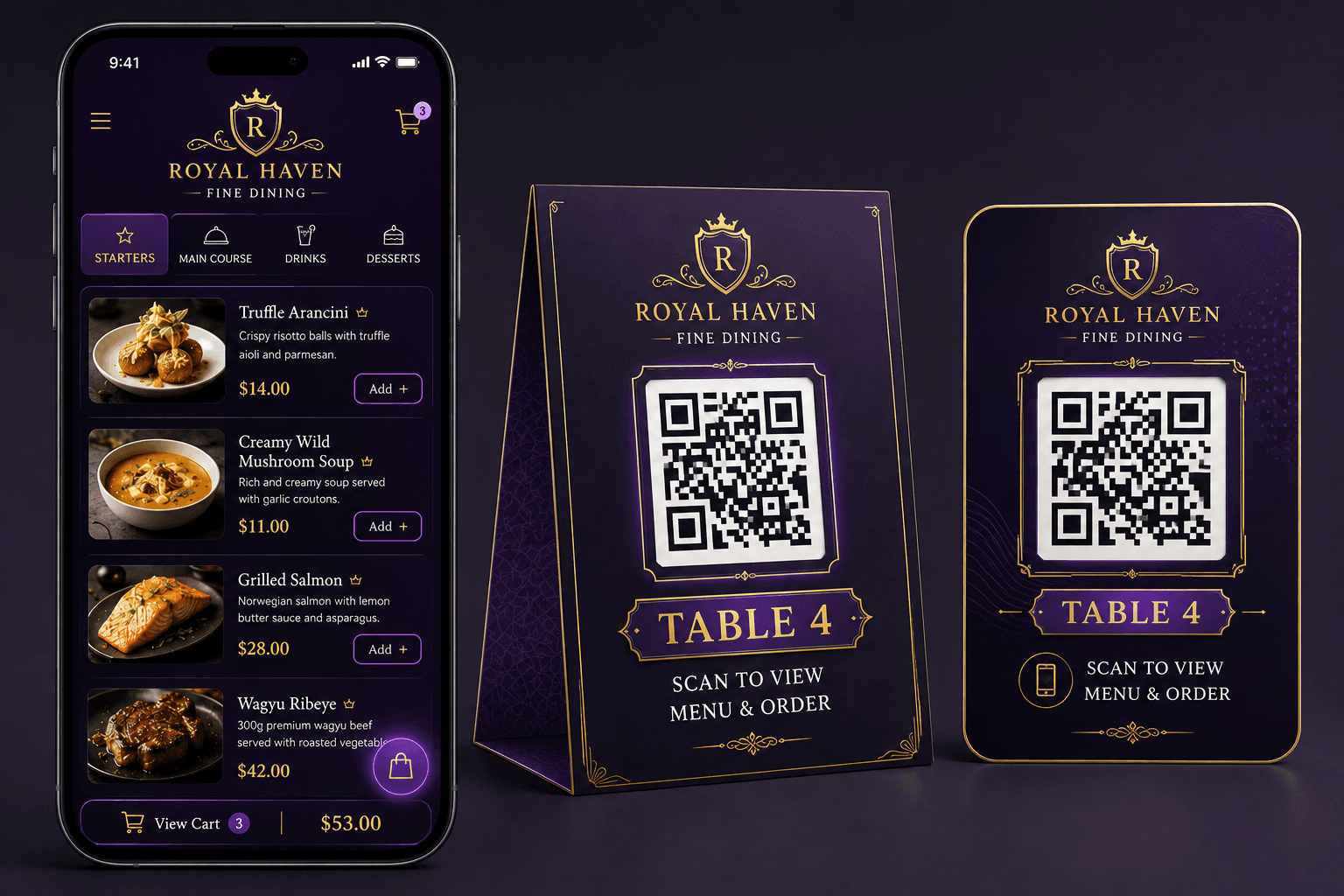
Royal Amethyst
Deep purple with a gold glow, for a rooftop or lounge feel.
Royal Minimal
Clean and quiet, when the food should do the talking.
Three floors and a private room? Still one tap per table.
Lay the restaurant out the way it actually is. Every table then carries a code that says exactly where it lives — on its QR card, in its link, and on the order that arrives in your kitchen.
Floors, and rooms inside them
Add a level in one field. Split any level into private dining rooms if you have them — most restaurants never need to, so the room picker only appears once you do.
The code says where the table is
f1-r2-t3 is Level 1, Room 2, Table 3. Read a QR link and you know which table it belongs to, without looking anything up.
Print the whole building at once
One button makes a card for every table, as a print-ready A6 PDF or images named Level-1, R-1, Table-1 — so reprinting one damaged card later takes seconds.
Tables
6 shownTable 1
Level 1 · Room 1
code: f1-r1-t1
Table 2
Level 1 · Room 2
code: f1-r2-t1
Table 3
Level 1 · Room 3
code: f1-r3-t1
Table 4
Level 2
code: f2-t1
Table 5
Level 2
code: f2-t2
Table 6
Level 3
code: f3-t1
Tap a floor above — the list filters exactly like the real dashboard.
Your menu speaks বাংলা — and English.
Not a translate button bolted on the side. Bangla is a first-class language across the diner's menu, the printed table card, and your own dashboard — and you decide which languages your restaurant offers.
Royal Haven

Scroll it, switch it, add something to the cart — this is the real menu template, not a picture of one.
One tap, no reload
Both languages ship with the page, so switching is instant — no second request to a restaurant Wi-Fi that may or may not be having a good day.
QR codes that carry the language
The language is baked into the code itself. Print Bangla cards for the family section and English for the bar — the diner scans and lands in that language, zero taps.
Fonts that respect the script
Nine Bengali-capable faces to choose from, and a Latin display font is never offered for Bangla. Wide letter-spacing and ALL CAPS drop away too — both break Bengali conjuncts.
A Bangla head start
Around 190 Bangladeshi dish and category names come pre-written — kacchi, tehari, borhani, firni. Hand-curated, never machine-guessed, and it never overwrites your wording.
Scale up only what you need.
The base plan covers menu, QR ordering, and reviews. These three modules are sold separately, so you only pay for what your restaurant actually uses.
Staff Management
Add manager and waiter accounts under your restaurant. Every order records exactly who accepted it and who served it, for every table.
Coupons
Create discount codes diners apply at checkout, with per-code usage limits and expiry.
Live Order Tracking
Diners see live status and their waiter's name, and can ring the manager for help — a distinct alert sound tells staff apart from a new order.
Run the till from the same dashboard as your QR menu.
POS & Inventory turns your reception counter into a real checkout — dine-in or takeaway, any payment method, receipt and kitchen-ticket printing, and stock that updates itself with every sale.
One screen for dine-in and takeaway
A cashier at reception picks a table or rings up a walk-in, taps items off the same menu you already built, and checks out — no separate system to keep in sync.
Cash, card, bKash, Nagad — recorded, not guessed
Every sale records exactly how it was paid, with change due calculated for cash. Confirming prints a customer receipt and a kitchen order ticket straight to your 80mm printer.
Stock that deducts itself
Link ingredients to a recipe once, and every sale — POS or QR — quietly takes stock off the shelf. A low-stock warning shows up the moment something's running out.
An end-of-day report that closes the till
Total sales, a payment-method breakdown, VAT and service charge collected, and who sold what — everything a shift handover actually needs, on one page.
Table 4 · Dine-in
POSPayment method
Tendered ৳1,800Change due ৳52
Same order, same kitchen queue, same live dashboard — whether it came from a diner's phone or the counter.
Run an offer without doing arithmetic at the table.
Create a discount code from the dashboard, and it shows up in the diner's cart the moment it goes live. The discount is applied, capped, and checked by the server — not negotiated with a waiter.
A percentage or a flat taka amount
10% off — but never more than ৳150. Cap a percentage discount so a large table can't quietly cost you a whole dish.
Rules that switch themselves off
Set a minimum order, an expiry date, and a total redemption limit. The code stops working on its own — nobody has to remember to go turn it off.
Nothing for the diner to type
Running offers appear right inside the cart. Tap one to apply it. Codes that expired or hit their limit are never shown in the first place.
The server does the math
The discount is recalculated against the real subtotal when the order is placed, so an edited cart can't invent one. Staff can also apply, swap, or clear a code on a live order — the new total appears on the diner's phone instantly.
Your order · Table 4
3 itemsAvailable coupons
Try LUNCH15 — 15% of ৳1,240 is ৳186, so the ৳200 cap leaves it alone. GRAND20 needs a bigger table.
Your menu comes with a whole review system.
Not a star rating bolted onto a QR code — the entire feedback loop for your restaurant. Verified ratings for the food, your waiters and the app, a dashboard that tells you which of the three is slipping, and the tools to reply and moderate. It costs nothing extra: it isn't an add-on, and it's on the cheapest plan exactly as it is on the most expensive one.
Every review is tied to an order your kitchen actually served. There is no public review form to brigade, no way for a rival to leave one, and no way for a diner to leave two.
01The order issues a private token
Generated when the diner places the order. It isn't in the page, the URL, or anything they can guess.
02Serving it unlocks the form
The token only reaches their phone once staff mark the order served — so nobody rates a meal that never arrived.
03They rate what actually matters
Overall, then food, service and the ordering app separately, plus a comment. Only the overall star is required.
04One review per order. Ever.
Enforced by the database, not just the screen. No open form exists anywhere — there is nothing to spam.
Across 128 served orders
Nusrat
Order #1043 · Table 7 · served by Rafi
Kacchi was excellent and it came faster than we expected. Ordering from the phone meant we never had to wave anyone down.
Replied by owner
Thank you Nusrat — I'll pass that on to Rafi and the kitchen.
See it by waiter
Every review carries whoever served that table, so a soft month is traceable to the kitchen or the floor — not a guess.
Reply, flag, archive
Answer a diner in their own thread, flag anything abusive, and archive what you've dealt with. Archived stops counting.
Private to you
Nothing is published — not here, not on your menu. This feedback exists for the people running the restaurant.
Your tables are waiting to take orders themselves.
Start your trial, build your menu, print your first QR — no card required to see how it works.